
Setting up an AVI cluster in the VI Workload Domain on VCF 9.x.
In this series of blogs, we will see how “AVI controllers will be deployed from the SDDC manager for providing Load Balancing services in the VI workload domain“. In the VI workload domain, NSX-T managers will be integrated with AVI controllers automatically, and small changes need to be completed before creating virtual services for the applications in the Workload Domain.
Diagram
In our environment, we have one Management Domain where all management components like SDDC Manager, vCenter, NSX Managers, and VCF fleet components of VCF 9.x will be deployed, and one Workload Domain where application-related VMs will be deployed. In the Management domain, we have four ESXi hosts with vSAN OSA (Original storage architect).

AVI controllers and Service engines are deployed separately from VCF Management components, so they are not part of VCF Lifecycle. All AVI components will be upgraded separately.
NSX Advanced Load Balancer or AVI Load Balancer has three important components: the Controller, the SE Engine, and the cloud connector.
AVI Controller: It is the central brain of the architecture. It manages, orchestrates, and monitors the entire lifecycle of the load balancer; however, it does not process actual application data traffic.
SE Engine: They are lightweight virtual machines, containers, or bare–metal instances that sit directly in the data path. They execute the actual L4-L7 load balancing, SSL/TLS offloading, caching, and Web Application Firewall (WAF) operations.
Cloud Connector: Avi Controllers use Cloud Connectors to natively integrate with your specific hypervisor, public cloud, or container platform APIs. This helps Avi to interact directly with the infrastructure, like dynamically provisioning SEs in AWS cloud or pulling node IPs from Kubernetes) without requiring manual network configuration.
It has different components like AKO, and so on. But in this series, we are not covering AKO (Avi Kubernetes Operator).
Configuration
Now, when our VCF environment 9.x is already deployed with one workload domain. Now it is the right time to focus on deploying our AVI controllers through SDDC Managers.

NB: The same process will be used to deploy AVI controllers in VCF 9.1. From the next lab, we will be using the VCF 9.0 infrastructure.
Login into the SDDC Manager, navigate to SDDC Manager > Lifecycle Management > Select the Workload Domain.

To deploy the AVI controllers, navigate to the workload domain where you want to deploy AVI controllers, click on Actions, and select Deploy AVI Controllers.

In the next step, some information has to be provided, such as version, form factor, IP address, password, and so on.

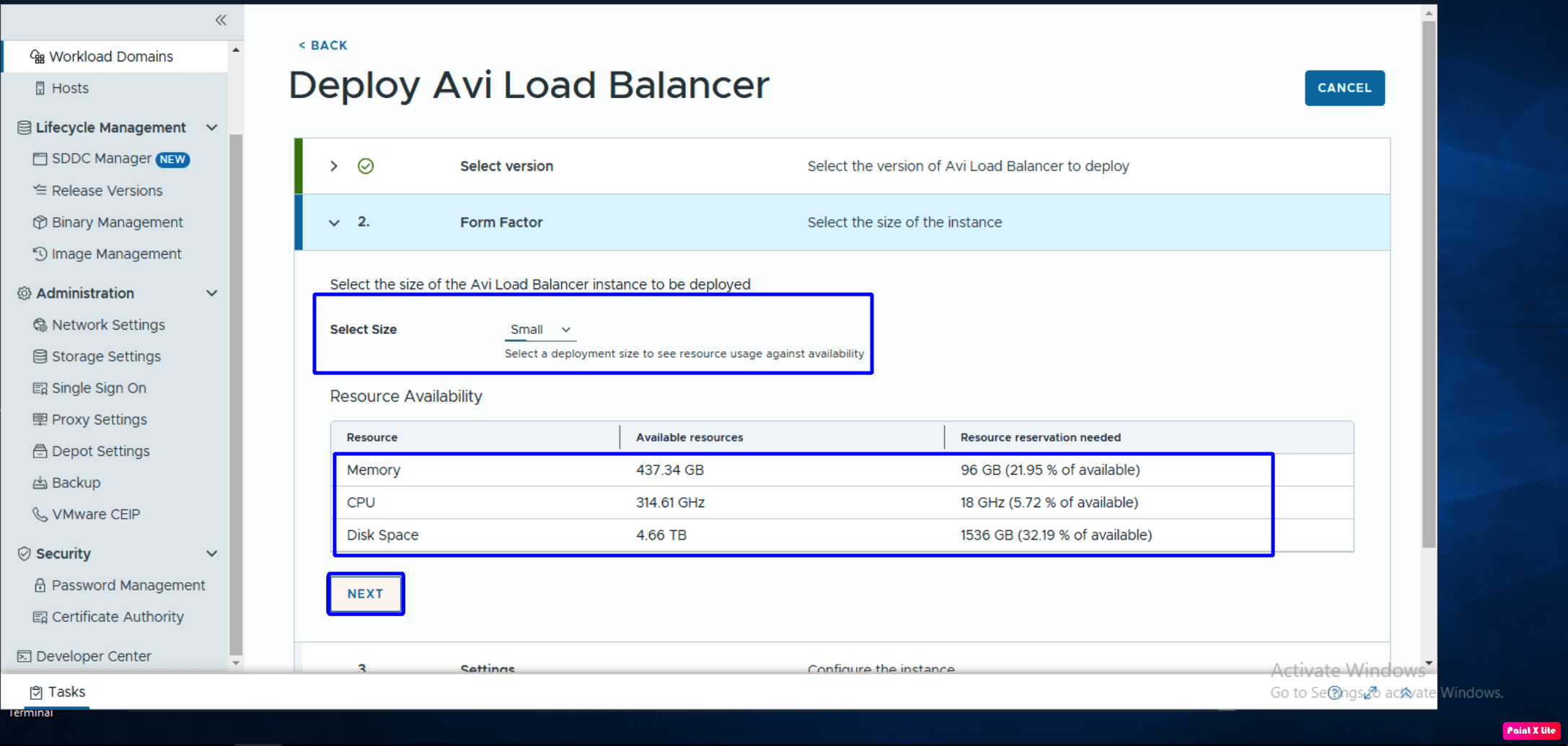
In our scenario, we will be deploying version 31.1.1 of the AVI controllers. To proceed with the deployment, we need to select the Size of the AVI controllers. These controllers will be deployed in the management domain; therefore, we have to do the sizing of the management domain appropriately to accommodate AVI controllers.
In the screenshot below, the SDDC manager will check the resources available in the Management domain and the resources these AVI controllers will consume.
In the next step, we need to provide the IP addresses of three AVI controllers along with the cluster FQDN and its name. Make sure DNS entries have been created in both forward and reverse entries.

In the final step, we need to review the details of the deployment like version, deployment size, node IP addresses, cluster name and its FQDN.

Deployment of AVI controllers will take 1-2 hours, and the progress can be viewed under recent tasks in the SDDC Manager and in the vCenter of the Management Domain.

To validate the deployment, navigate to the SDDC Manager – Workload Domain– Select the workload domain– Services. Newly deployed AVI controllers can be viewed and accessed from here.
NB: AVI controllers are deployed in the Management domain, where Service Engines will be deployed in the workload domain. Make sure to open firewall rules between AVI controllers and AVI Service Engines. Kindly refer to Broadcom Ports and Protocols TechDocs
Summary
In this blog, we have successfully provisioned AVI controllers using VCF 9.x SDDC Manager. In the upcoming blog posts, we will discuss deploying VNA clusters, creating our first distributed transit gateway, and updating NSX cloud in the AVI controllers. We will also integrate all these components with VCF Automation 9.x.


Leave a Reply