

Automation is imperative in today’s era to ease the responsibility of engineers and to avoid manual errors. In this blog, we will cover all necessary configuration required to integrate NSX-T with NSX-ALB (AVI Controller) via terraform. We have already touch based on the basic building blocks of terraform required to configure NSX-T via it .Please refer my blog https://vxlearners.com/2023/09/08/infrastructure-as-a-code-automating-nsx-t-via-terraform/
Topology Diagram
In our environment, we have already deployed NSX-T (single controller), NSX- ALB controller, and single edge cluster. We have also configured one tier-0 gateway using the edge cluster, which is connected to upstream routers via BGP. Using terraform three separate logical segments like AVI SE management segment, data segment, and one for LB SE VIP will be created. Along with it, a new Tier-1 gateway will be configured and connected to parent Tier-0 gateway. Any configuration work on vCenter is out of scope of this article. However, we will call its object using terraform like “Content Libraries”, credentials, and so on.

Pre-requisites
In order toBelow are the perquisites in order to configure NSX-T and NSX-ALB logical constructs via Terraform.
- Linux Server is able to reach NSX-T manager, vCenter, and AVI Controller on port 443.
- Terraform must be installed on the Linux machine or Windows machine.
- Vlan and Overlay transport zones have been configured in NSX-T and ESXi hosts must be prepared for NSX-T consumption.
- Tier-0 and its respective components like Edge-Cluster(include deployment of NSX-T edges), uplink interfaces, transport zones, and BGP have been configured manually. (This can also be achieve via Terraform).
- Content Libraries must be created on vCenter, where AVI controller will push the AVI SE software images.
- Configuration of NSX-T logical constructs like Tier-1 gateway, Logical Segments, DHCP server required to be used in NSX-ALB Cloud (all these configurations will be done via terraform in this document).
Validation of Prerequisites
In the first step, we will validate the configuration vCenter content libraries required by the NSX-ALB required to push AVI SE images.
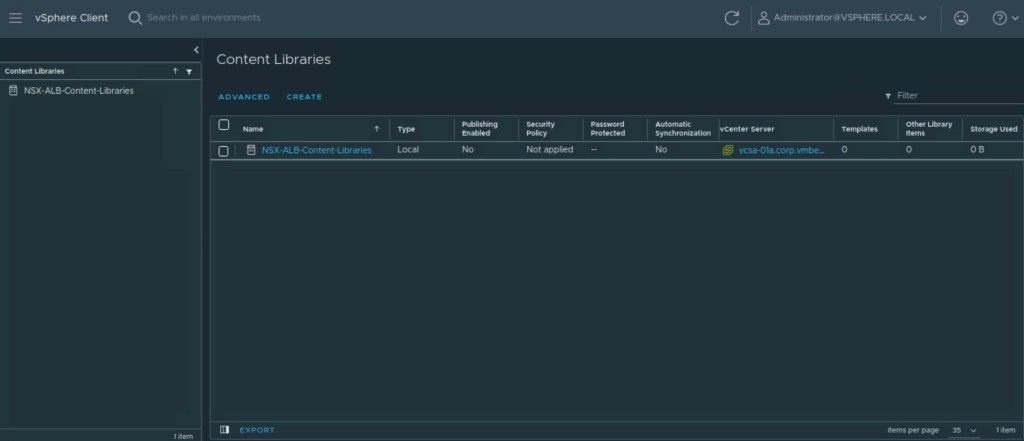
In the next step, we will verify the creation of the NSX-T Tier-0 gateway where new Tier-1 gateway will be connected. New Tier-1 gateway will create via Terraform in this blog.

Let’s verify the uplink connectivity of Tier-0 gateway in “Network Topology” in Networking section of NSX-T.

Configuration NSX-T logical constructs via Terraform
In this step, we will create all necessary files required to run terraform on linux machine. Below are the file names we will showcase in this document.
–> Provider.tf (this file will include all VMware providers (vSphere, NSX-T, and NSX-LAB) required for terraform to make changes.
–> Variable.tf (this file include all the variable components required by main.tf like login credentials, name of transports zone, and so on.
–> Main.tf ( this is imperative terraform file that includes all the configuration to create necessary objects in vSphere, NSX-ALB, and NSX-ALB). Any other terraform providers is out of the scope of this document.
It is the right time to break the ice and start exploring the terraform scripts. If you don’t specify the version of VMware providers, it will use the latest version of vSphere, NSX-T, and NSX-ALB.

In this step, we will go through the contents of variable.tf. More contents will be added when we will start focusing on NSX-ALB.


In the next step, we will showcase the contents of main.tf. More contents will be added when we will start focusing on NSX-ALB.
In the main.tf, we are creating provider for the NSX-T manager and along with it we are creating data sources for existing NSX-T logical constructs.

Now we will create a Tier-1 gateway along with DHCP server which will provide IP addresses to AVI SE data and management vNIC’s.
| Gateway | Tier-1 |
| Name | Tier1_NSX_ALB |
| Edge_Cluster | EdgeCluster-01a |
| Enable Firewall | True |
| Connected Tier-0 Gateway | T0-GW-01 |
| Route_Advertisement | Connected, lb_vip |
We will also create one DHCP server via Terraform which will assign IP addresses to AVI SE data and management virtual network interface cards.
| Name | DHCP_SERVER_NSX_ALB |
| Edge Cluster | EdgeCluster-01a |
| Server_Address | 100.64.64.100/24 |
| Lease Time | 200 |
| Display_Name | We created this DHCP server with Terraform |
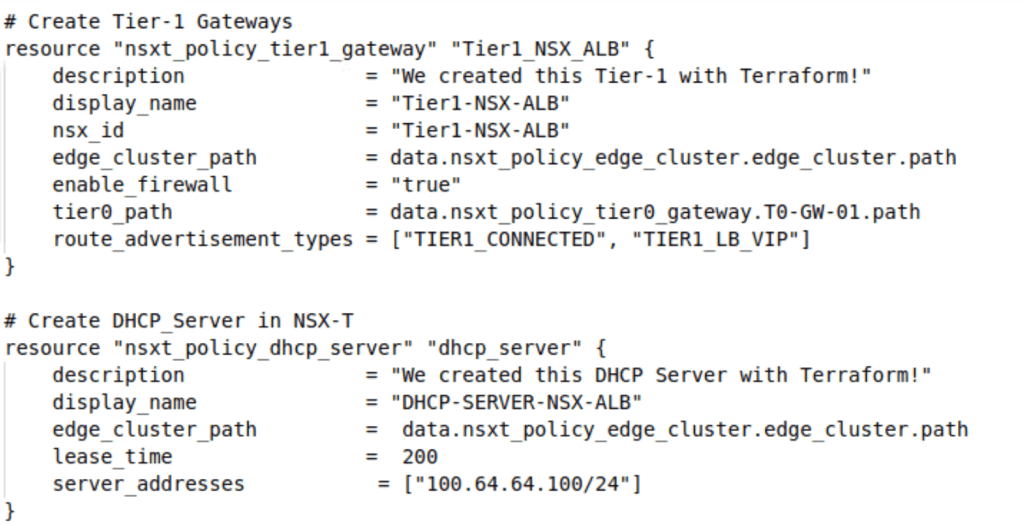
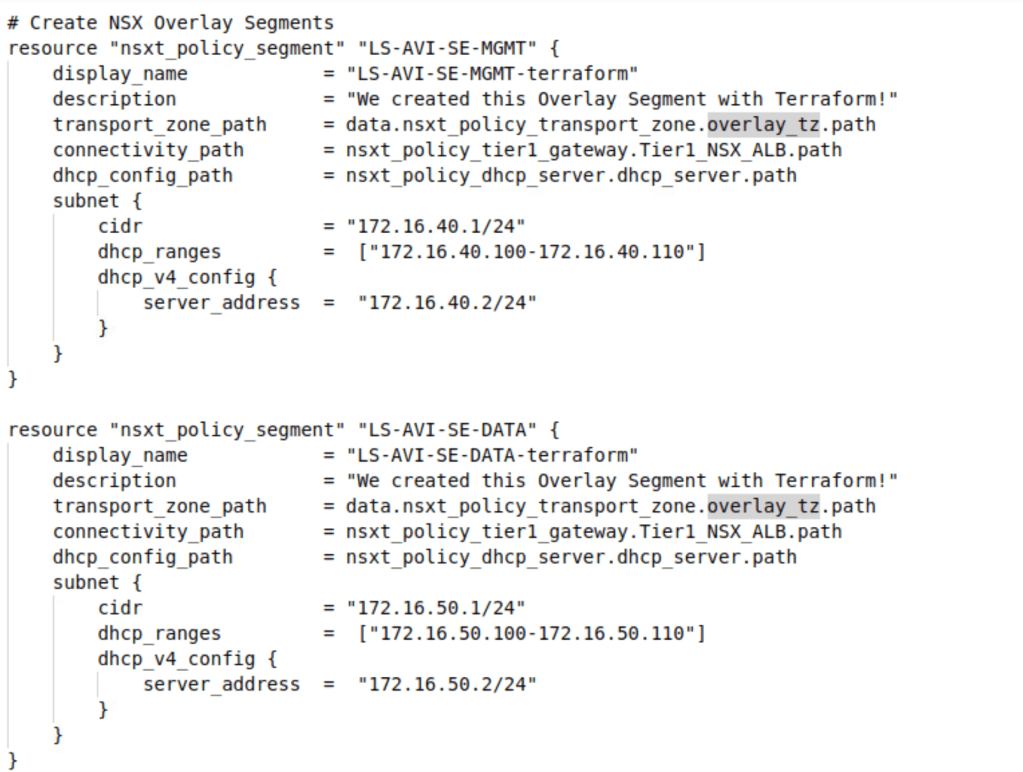
After successful creation of DHCP server, and Tier-1 gateway, we will start configuring Logical Segments for Data and Management networks.
| Name | LS-AVI-SE-MGMT-terraform |
| Transport Zone | Overlay_TZ |
| Tier-1 Gateway | Tier1_NSX_ALB |
| DHCP Server | DHCP_SERVER_NSX_ALB |
| Subnet | 172.16.40.1/24 |
| DHCP Ranges | 172.16.40.100-172.16.40.110 |
| DHCP Server Address | 172.16.40.2/24 |
| Name. | LS-AVI-SE-MGMT-terraform |
| Transport Zone | Overlay_TZ |
| Tier-1 Gateway | Tier1_NSX_ALB |
| DHCP Server | DHCP_SERVER_NSX_ALB |
| Subnet | 172.16.50.1/24 |
| DHCP Ranges | 172.16.50.100-172.16.50.110 |
| DHCP Server Address | 172.16.50.2/24 |
Now it is the time to initialise the terraform from the management PC (on which Terraform is installed). In below step, terraform is initialised successfully.

Now we will apply the terraform script so that it will configure all necessary logical constructs in the NSX-T Manager.


Please type “Yes” so that terraform will configure all logical constructs.
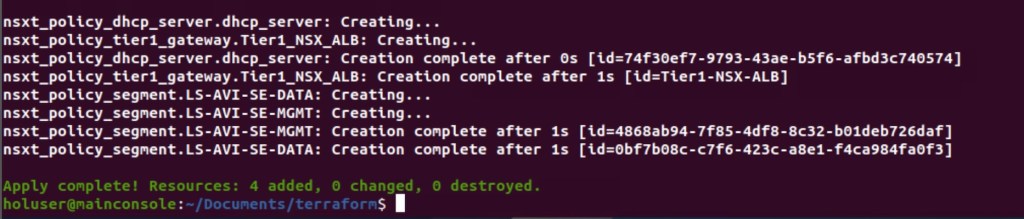
In above configuration, it is self-explanatory that configuration has been done successfully.
Validation
In this step, we will validate the creation of NSX-T logical constructs.
Firstly, we will validate the all the NSX-T Tier-1 Gateway created via the Terraform.

Now, we will verify the logical segments configured via Terraform. These logical segments enabled for DHCP (highlighted in blue). Both logical segments have zero ports because NSX-T cloud for NSX-ALB as not been configured yet, and no AVI SE’s are spin up yet.

Now we will verify the Tier-0 gateway, as newly created Tier-1 is connected to existing Tier-0 gateway. In the Network Topology, it is clear that all necessary configuration on NSX-T is completed.

In Summary:
In this blog, we have configured pre-requisites required to configure the NSX-T cloud connector in the NSX ALB Controller like logical segments, Tier-1 gateway, and DHCP server via Terraform. In our environment, Tier-0 gateway, Edge Cluster, and transport zones are already created. We have leveraged the existing NSX-T and vSphere components.
In the next blog, we will create NSX-T cloud, AVI SE group, and our first virtual services via terraform. We will also perform necessary testing to validate the creation of it.
I will also upload the terraform script used in this blog on the Github repository.


 vxlearners
Leave a reply to Infrastructure as a Code- Automating integration of NSX-T with NSX ALB via Terraform-Part-2 – vxlearners Cancel reply