

Introduction
In the first part of this series, we successfully completed the prerequisites. These included preparing the cluster for NSX-T, creating edges for Tier-0 and L2 bridge, and creating the Tier-0 gateway. We also configured BGP and route redistribution. In the vCenter, we configured a resource pool on the NSX-T prepared cluster. Additionally, we set up one dummy network (port-group) on the NSX-V prepared cluster. We successfully imported necessary vCenter and the NSX-T objects in the vCD like Provider gateway, External network, and Provider vDC.
In the second part of this blog, we discussed about the flow how the migration tool worked. We also updated the sameUserInput file. Then, we ran the preCheck. This was to get the list of remediation (need to be rectified) in the source environment. We also executed the tool to create OrgVDC on the NSX-T environment. We also validated that the tool has successfully created the Tier-1 gateway, logical segments. The tool has extended the source network to destination network via bridging.
In this part, we will perform remaining stages like services and movevapp of the migration tool. Along with it, we will also run the clean-up to free-up the resources on the source environment.
Diagram
As we discussed in the last part, our environment has one organization named “Admin“. Under this organization there are two Org vDCs: VDC1 and VDC2. Both these VDC’s are backed by NSX-V. In the first Org vDC, there is one ESG (edge-1) connecting to the physical router. A DLR (edge-2) connects to ESG. Logical switches connect to the DLR. This org vDC also has direct (via dPG) and isolated networks (not connected to gateway). ESG also hosts services like route IPsec route based tunnels.In the second Org vDC, there is one ESG (edge-3) connecting to the physical router. A DLR (edge-4) connects to ESG. One routed logical switch connects to the DLR. The below diagram shows the existing connectivity before the migration.

In the last part of this series, we executed the tool to completed stage-1 (topology), and stage-2 (Bridging). Below diagram represents the current configuration at the target environment. bridges are created to extend the network from source environment to the destination OrgVDC.

Configuration
In the last part, we already executed the tool for topology and bridging (https://vxlearners.com/2024/09/17/migrating-nsx-v-backed-org-vdc-to-nsx-t-using-open-source-migration-tool-part-2/). After the bridging, we need to run the “Services.” This will replicate the firewall rules. It will also replicate NAT services and route-based or policy-based IPsec VPNs. It will also connect logical segments to the Tier-1 gateways and Tier-1 gateway to Tier-0 gateways. It will also disconnect the interfaces on the NSX-V ESG’s. and start advertising the traffic via Tier-0 gateway. In a nutshell, this step performs two steps, one is to replicate the services, and second is to perform North-South switchover.


Now it is the time to validate on the NSX-T environment, whether necessary configuration has been replicated or not. There will no outage on the VMs connecting in the NSX-V environment because VMs will use NSX-T environment to route the traffic outside using L2 bridges configured in step-2.
After the validation, it is the right time to migrate the vApps. The migration will be from source OrgVDC backed up by NSX-V to destination OrgVDC backed up by NSX-T. In the next step, we will execute the last stage of migration which is movevapp. In our environment, we have only one VM in the source OrgVDC, so it will not take much time.

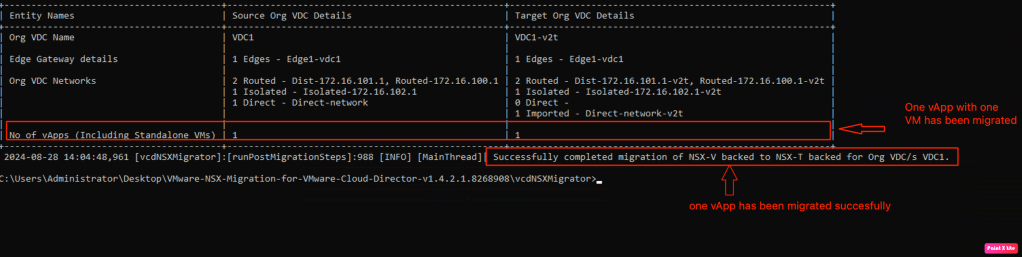
We ran the last stage of the tool. One vApp was successfully migrated to the destination OrgVDC backed up by the NSX-T. Nevertheless, all the objects created in the destination OrgVDC has suffix “v2t“
In the last and final step, we will run the clean-up. This will remove all the objects created in the OrgVDC backed up by the NSX-V. Along with it, This stage will also remove suffix “v2t” from the objects created in the target OrgVDC.
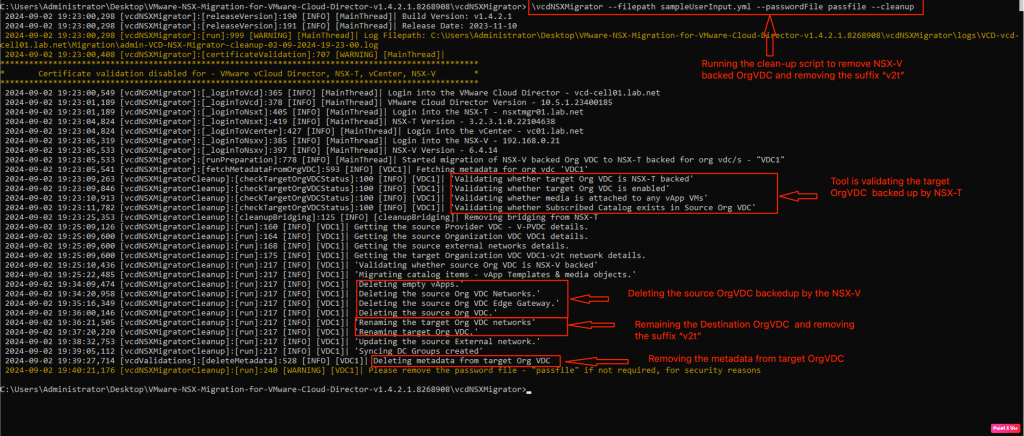
After the successful migration and clean up activities, below topology demonstrates “how the connectivity will look like in the destination environment

In our case, we have only migrated single OrgVDC and executed the migration in stages. But, we can execute the migration for another OrgVDC in single go.
NB: We will not showcase the migration of second OrgVDC in this series of blog.
Validation
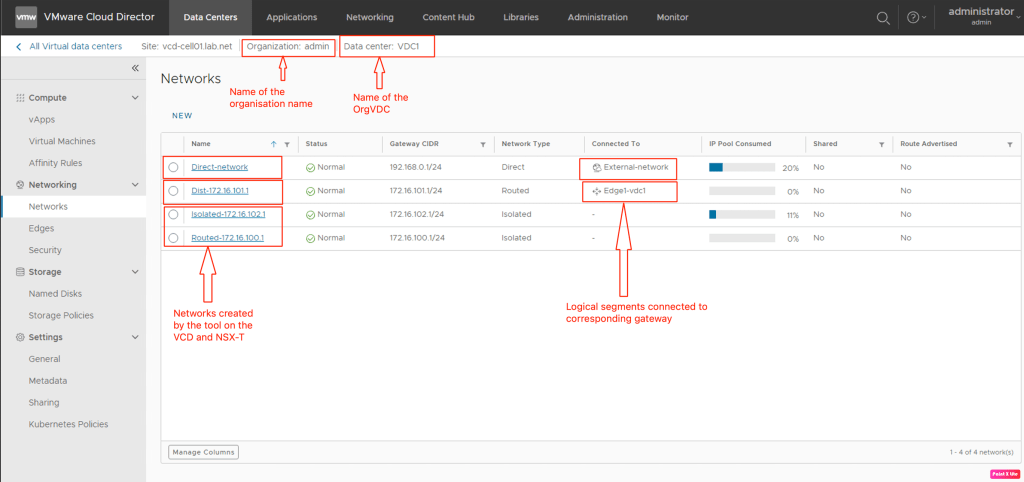
In this section, we will verify the creation of Tier-1 gateway and necessary segments (routed, isolated) tool has created on the vCD environment.
We will login into the OrgVDC and validate the tier-1 gateway.

In the next step, we will verify the networks created in the OrgVDC.
Summary:
In the first blog, we had successfully completed the prerequisites like preparing the cluster for NSX-T, creating edges for Tier-0 and L2 bridge, creating the Tier-0 gateway and configuring BGP, route redistribution, In the vCenter, we had configured a resource pool on the NSX-T prepared cluster and one dummy network on the NSX-V prepared cluster. We had imported all the vCenter and the NSX-T objects in the vCD like Provider gateway, External network, and Provider vDC.
In the second blog, we had discussed about the flow about how the migration tool will work. We updated the sameUserInput file and ran the preCheck to get the list of issues in the source environment. We also executed the tool to create OrgVDC on the NSX-T environment. We also validated that the tool has successfully created the Tier-1 gateway, logical segments. This tool has extended the source network to destination network via bridging.
In this blog, we performed remaining stages of the migration tool along with it we executed the clean-up to free-up the resources on the source environment.


 vxlearners
Leave a comment