

Introduction
In the last blog, we have successfully completed the pre-requisites like preparing the cluster for NSX-T, creating edges for Tier-0 and L2 bridge, creating the Tier-0 gateway and configuring BGP, route redistribution, In the vCenter, we have already configured a resource pool on the NSX-T prepared cluster and one dummy network on the NSX-V prepared cluster (This network is very useful whenever we perform the gateway and services cutover from V2T). At the end, we imported all these objects belonging to the vCenter, NSX-T in the vCloud Director like Provider gateway, External network, and Provider vDC
In this blog, we have to pull up our sleeves, and start preparing the tool for migration. We will also perform different stages of the migration like topology, bridging, services, and movevapp in more detail. After the migration, we will perform clean-up to free up the resources at the source data center.
NB: V2T Assessment will not be performed in this blog because performing the pre-checks will give complete list of remediation.
Diagram
As we discussed in the last part, our environment has one organisation named “Admin“, under this organisation there are two Org vDC VDC1 and VDC2. Both these VDC’s are currently backed by NSX-V. In the first Org vDC, there is one ESG (edge-1) connecting to the physical router, a DLR (edge-2) connecting to ESG, and logical switches connecting to the DLR. This org vDC also has direct (via dPG) and isolated networks (not connected to gateway). ESG also hosts services like route IPsec route based tunnels.In the second Org vDC, there is one ESG (edge-3) connecting to the physical router, a DLR connecting to ESG (edge-4), and one routed logical switch connecting to the DLR. The below diagram represents the existing connectivity before the migration.

In order to proceed with the migration tool, there are few requirements that have to be completed. In the below section, we will discuss all necessary object creation in the vCD, vSphere, NSX-T, and so on.
Configuration
In the last part, we download the tool from the GitHub repository. Let’s start playing with it.
The downloaded software is present on the Desktop and we need to update necessary files present within the vcdNSXMigrator folder yo initiate the migration procedure. In this blog, we will not consider samev2tAssessmentInput file as it out of scope of this blog.
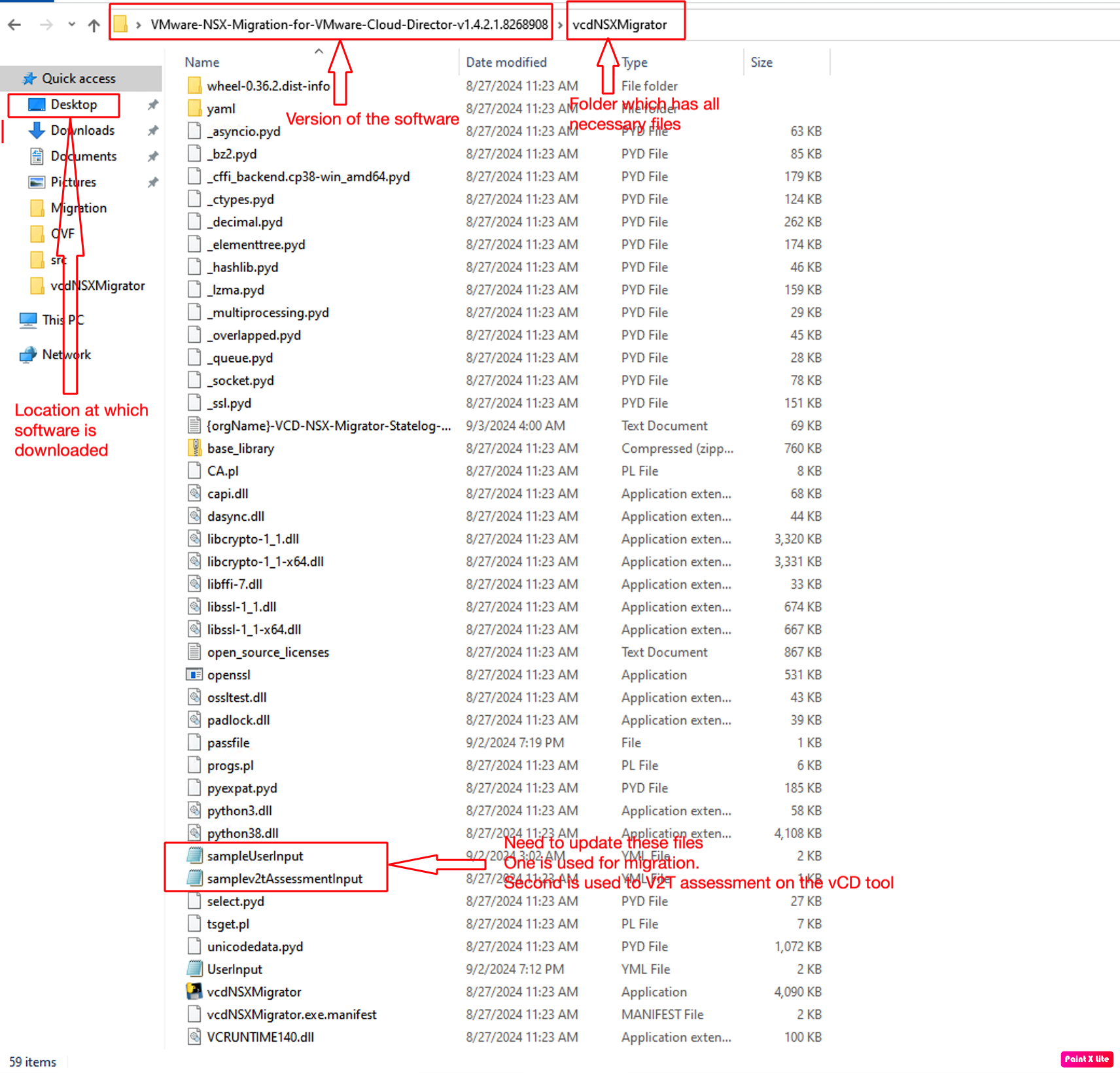
We need to amend the file called “SampleUserInput.yml” file. This file includes information about NSX Advance Load Balancer also. However, migrating load balancing services from vCD NSX-V backed to NSX-T backed is out of scope of this blog.
Let’s update the above file to include required parameters. The below screenshots represent details of our existing environment including the vCenter, the vCD, and the NSX-T Manager.

In the above sample user input file, we haven’t provided any details related to the password of the NSX-T, vCD, and vCenter. Whenever we execute this file for the first time, tool will ask for the password and create a new file call “passfile” and it will be stored in the vCDMigration folder. We have created below diagram to represent the steps in which tool will perform the migration along possible rollback steps and clean-up procedure.

This tool will not work on “Powershell“, therefore we have to use Windows command line tool to execute the tool. This tool has four stages Topology, Bridging, Services, and Movevapp. We will run the preCheck before the migration to list the existing issues in the source environment.
Let’s start the migration by performing the preCheck. open the command line interface on the windows machine and go to vCD migration tool folder. “C:\Users\Administrator\Desktop\VMware-NSX-Migration-for-VMware-Cloud-Director-v1.4.2.1.8268908\vcdNSXMigrator”
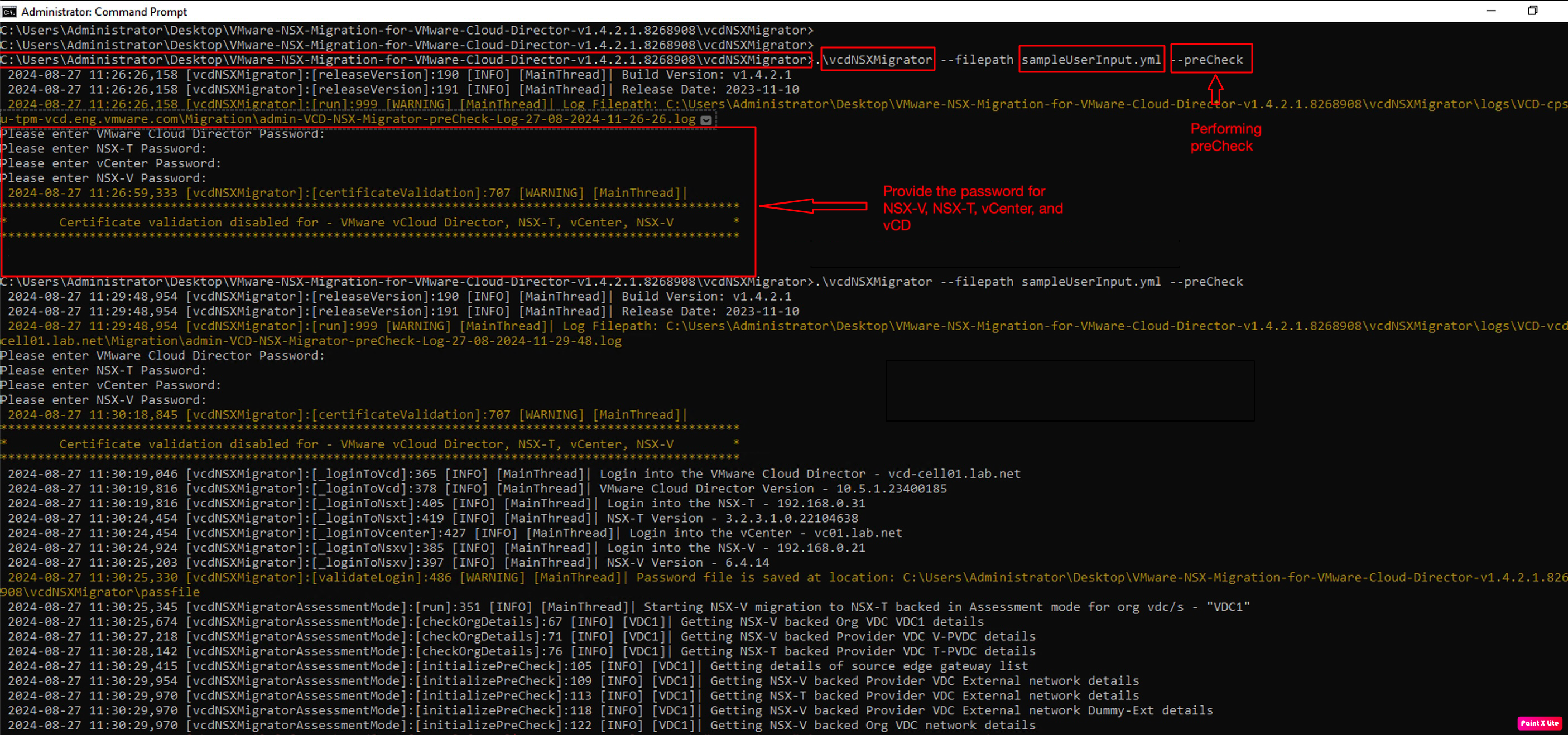
After running the preCheck, we need to remediate the issues tool has highlighted in the below.
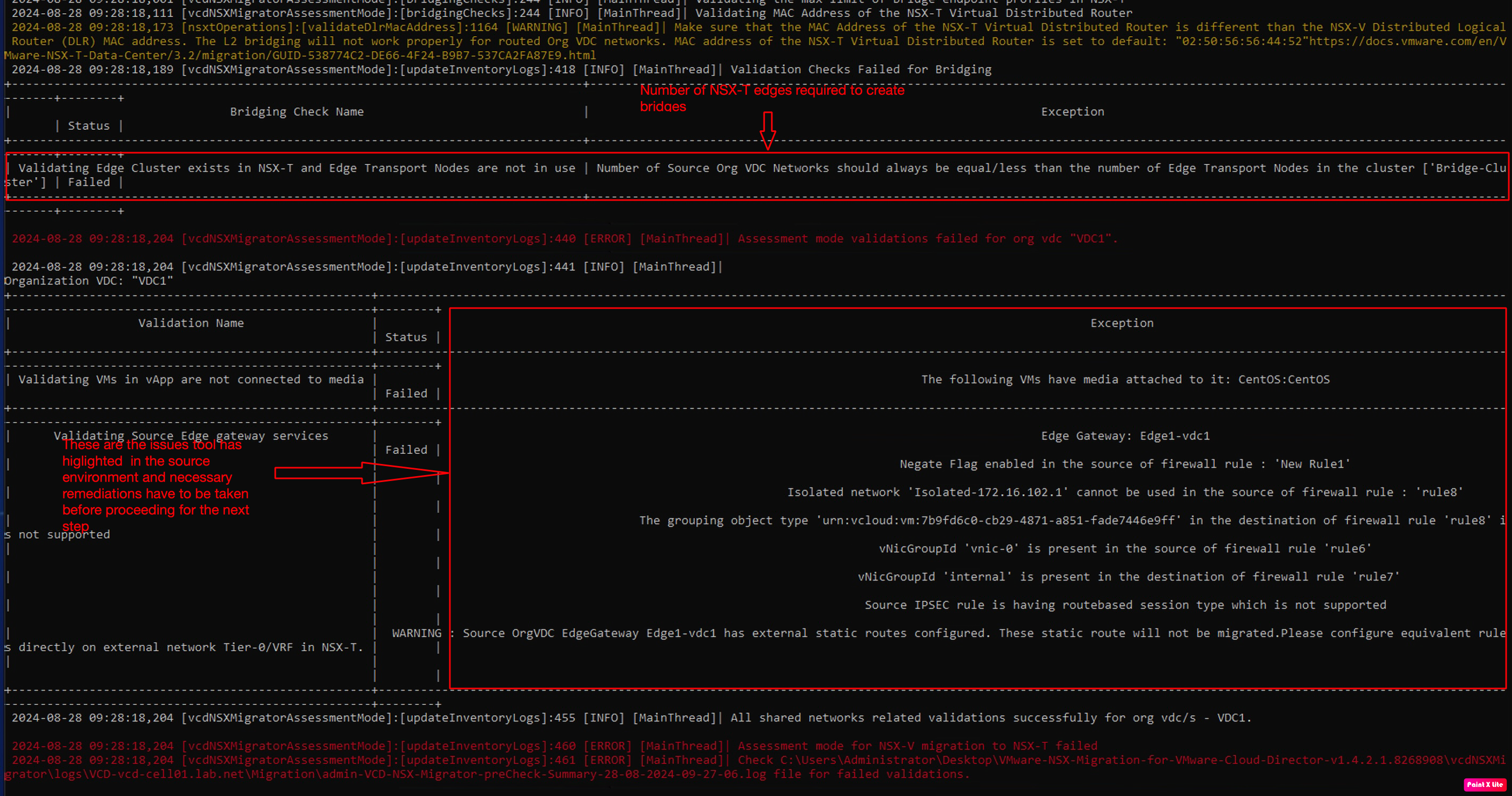
Remediating the issues is out of scope of this blog. After completing the remediation, we need to re-run the preCheck to verify whether we are good to proceed further. Let’s re-run it.
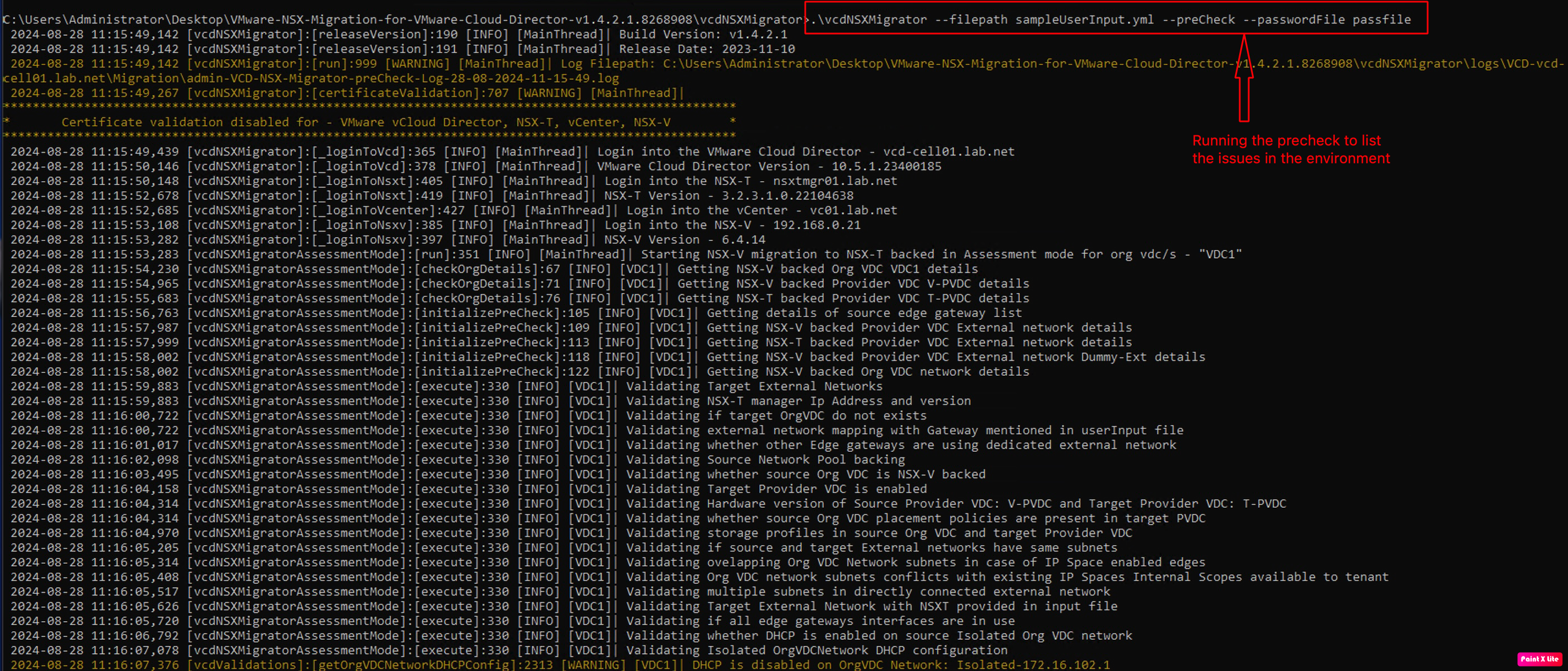

In the above output, static routes are missing on the NSX-T. Therefore, these routes need to be configured either before the migration or after it. In order to avoid network outage, it is preferable to configure them before the migration. These are warnings which can be ignored and we can proceed for next migration step.
In the next step, we will run the tool again to execute the “first phase of migration” which is “Topology“. This step will create a new NSX-T based OrgVDC , Tier-1 gateways, logical segments (add v2t suffix at the end) and will not connect to each other.


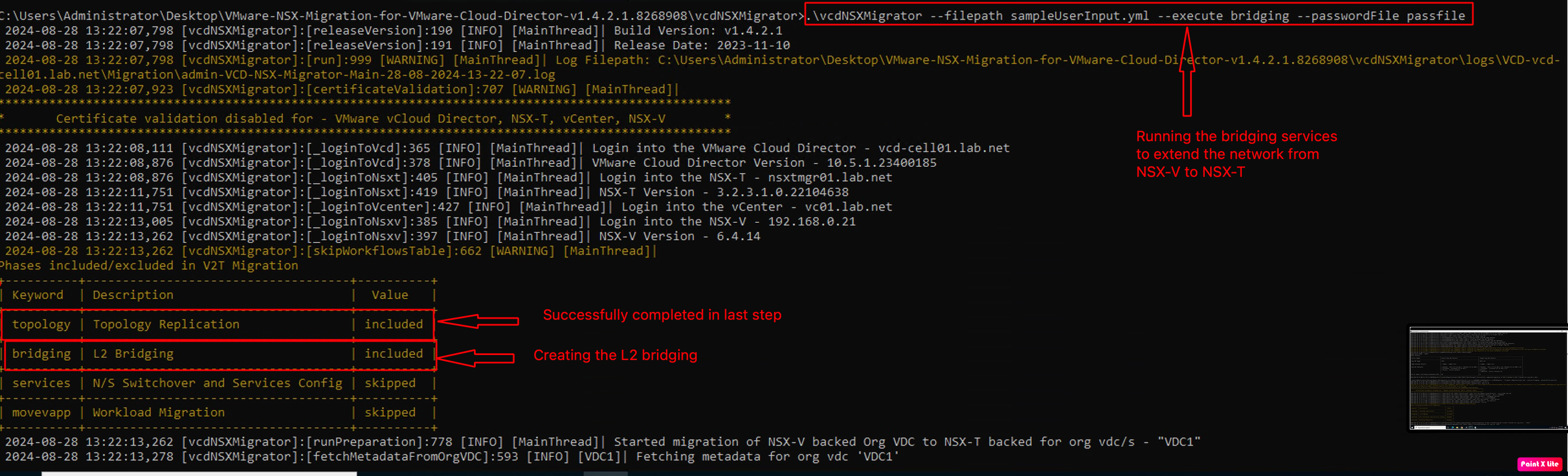
After the topology migration, we need to run the “Bridging” to extend and connect the existing NSX-V backed networks to the destination logical segments NSX-T. In this step, tool will create a new bridge transport zone, bridge uplink profile, a new nVDS (for bridging), changing the security settings on logical switches, changing the MAC address of Tier-1 gateway, create a bridge profile and attach it to the logical segment.

Below image represents the logical objects step-1 and step-2 have created on the destination environment including one NSX-T based OrgVDC, one Tier-1 gateway, and extension of NSX-V backed networks to NSX-T logical switches using the edge bridge cluster configured in the last blog.

Summary:
In the first blog, we have successfully completed the pre-requisites like preparing the cluster for NSX-T, creating edges for Tier-0 and L2 bridge, creating the Tier-0 gateway and configuring BGP, route redistribution, In the vCenter, we had configured a resource pool on the NSX-T prepared cluster and one dummy network on the NSX-V prepared cluster. We had imported all the vCenter and the NSX-T objects in the vCD like Provider gateway, External network, and Provider vDC.
In this blog, we have discussed about the flow about how the migration tool will work. We updated the sameUserInput file and ran the preCheck to get the list of issues in the source environment. We also executed the tool to create OrgVDC on the NSX-T environment. We also validated that the tool has successfully created the Tier-1 gateway, logical segments. This tool has extended the source network to destination network via bridging.
In the next part, we will perform remaining stages of the migration tool along with it we will also run the clean-up to free-up the resources on the source environment.


 vxlearners
Leave a comment