

When I started learning “Automation”, I was always told about the mis-concepts of it like Automation will kill your job? Why Automation? Why a Network engineer should learn automation. However, when I got the opportunity to enhance my skills in automation like configuring “SNMP”, “Access-lists” and “Vlan’s” then I came across its actual value. In this blog, We will discuss automating the NSX-T environment via Terraform. We will discuss various building blocks like providers, data sources, and logical constructs required to build terraform scripts.
Topology Diagram
In the below diagram, we have a Tier-0 gateway connecting to both R1 and R2 via BGP. However, in our environment, we don’t have a Tier-1 gateway along with three logical segments “Web-Segment”, “App-Segment”, and “DB-Segment”. In this blog, we will create all components highlighted below in red via Terraform, including Distributed Firewalling and Gateway Firewalling. Any changes in the vSphere environment are completely out of the scope of this blog. All VMs in their respective logical segments will be connected manually, which can also be achieved via Terraform
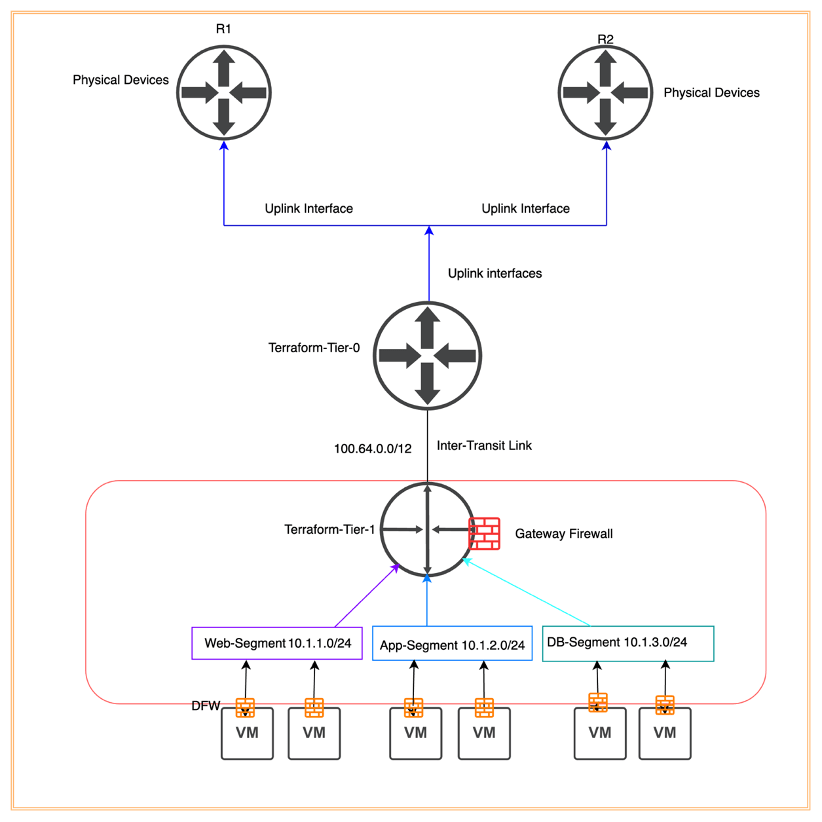
NB: All components in box red will be configured via Terraform
Below are the perquisites in order to configure NSX-T logical constructs via Terraform.
- Linux Server is able to reach the NSX-T manager on port 443.
- Terraform must be installed on the Linux machine.
- Tier-0 and its respective components like Edge-Cluster, interfaces, transport zones, and BGP have been configured manually. (This can also be achieved via Terraform)
Below is the list of logical constructs, which we will build via Terraform.
| Components | Number |
| Tier-1 | 1 |
| Logical Segments | 3 |
| Security Groups | 3 |
| Service | 1 |
| Distributed Firewalling Policy/Rules | 1/4 |
| Gateway Firewalling Policy/Rules | 1/2 |
Per-validation
In this step, we will validate existing NSX-T configuration, connectivity between Linux machine and NSX-T manager, Tier-0 configuration (Interfaces and BGP configuration), transport zones, and so on. In the first step, we will validate the NSX-T environment.
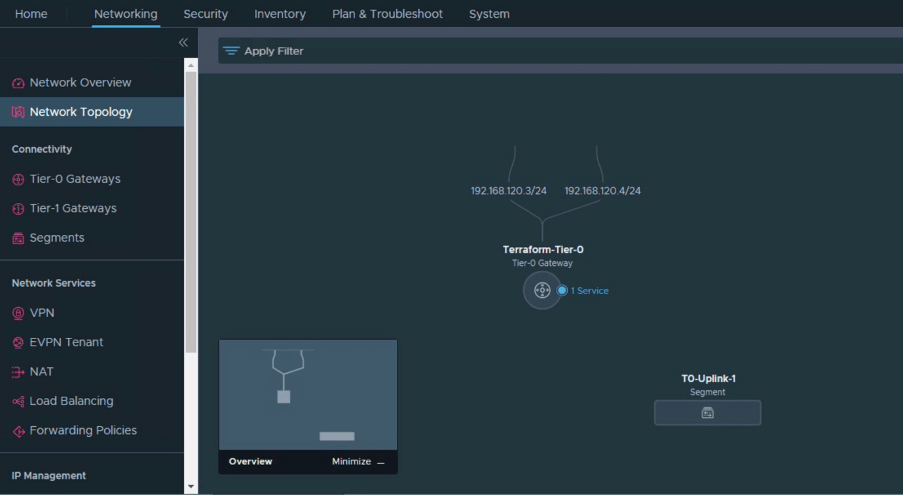
A single Tier-0 has been configured which has two interfaces. “T0-Uplink-1” is vlan based NSX-T segment

Tier-0 has been pre-configured and the current status of Tier-0 is showing as “Success”.
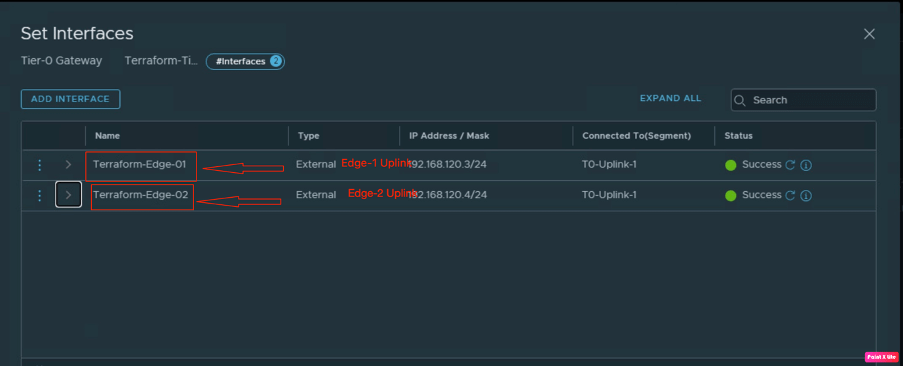
Now we will check the status of interfaces on the Tier-0 gateway. This Tier-0 has two interfaces, one is connecting on “Edge-1” and the second is connecting on “Edge-2”.

Now we will verify the BGP connectivity on Tier-0 “Terraform-Tier-0”.

Before proceeding with configuration work, we will verify that the existing setup, no Tier-1 gateway is configured.
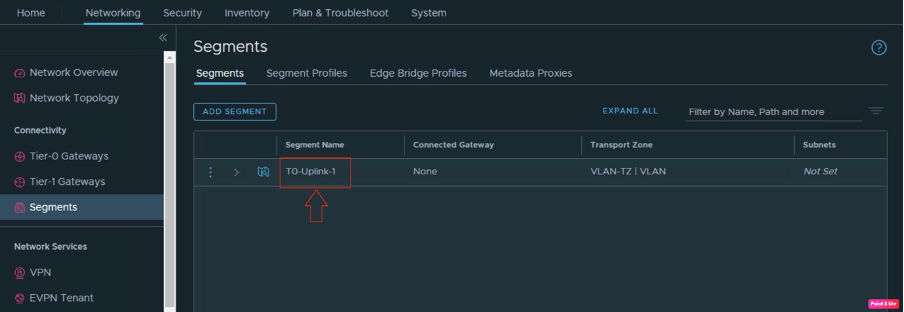
There is only one segment present on NSX-T, which is the NSX vlan-based segment, used to provide uplink connectivity to both edges.
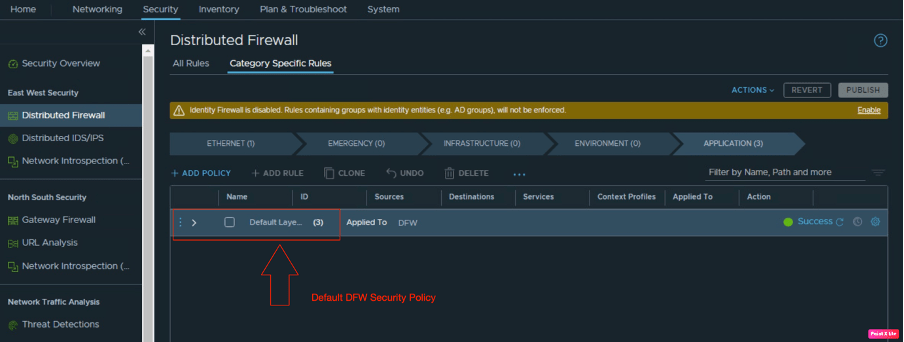
Before verifying the connectivity of the NSX-T manager from the “Linux” VM, we will also verify the existing DFW policies. “This is the default policy”. We will create one using Terraform.
However, Tier-1 has not been configured yet, therefore, there is no gateway firewall policy.
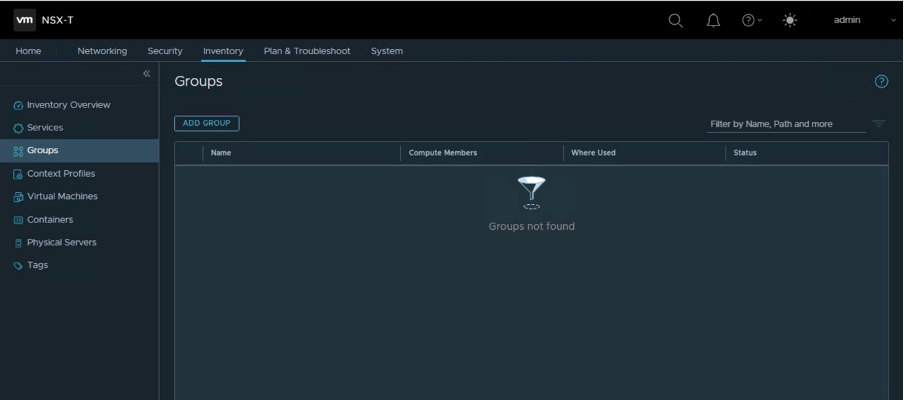
Let’s verify the existing security groups and services. In the below diagram, it is clear that in the existing environment, there are no security groups.
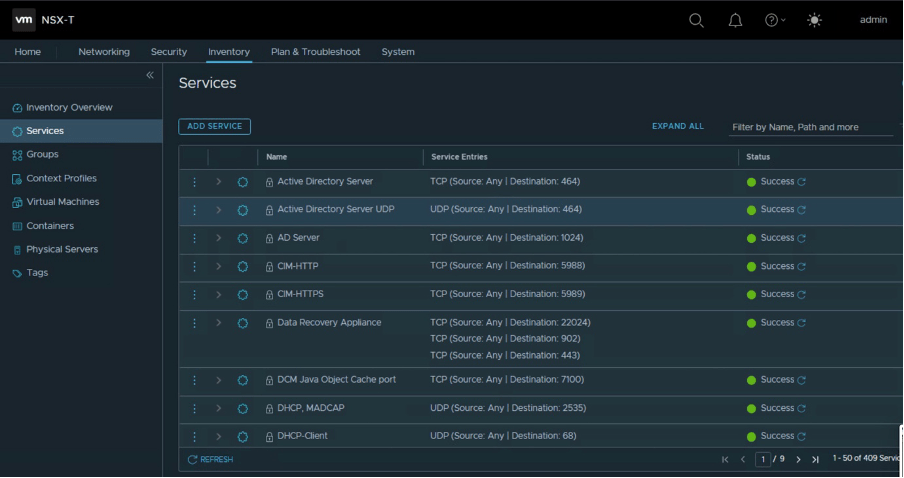
However, there is no service for TCP-8443, which we will be creating through Terraform.
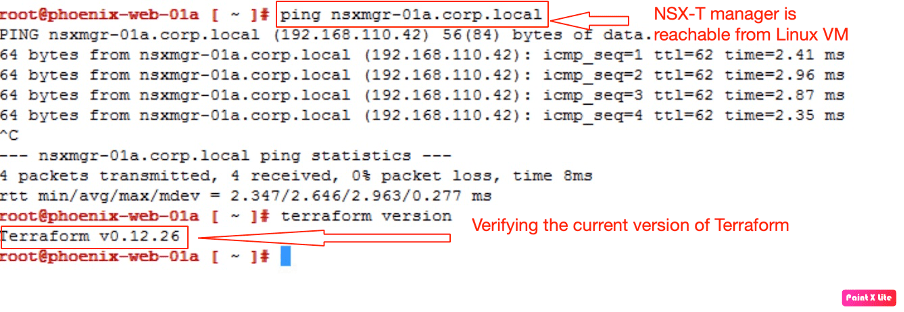
Now we will log in to the Linux VM and check the network connectivity to the NSX-T manager and the current version of Terraform configured
Configuration
In this step of the blog, we build our terraform script to build our NSX-T constructs like Tier-1 gateway, Logical segments, distributed firewalling, and many more.
Configuring Provider using Terraform
In this step, we will create a Terraform provider, which in our case is the NSX-T manager. We also need to provide NSX-T manager admin credentials, so that Terraform will configure NSX-T constructs in the NSX manager

Creating NSX-T provider in Terraform script
Configuring Data sources using Terraform
In the next step, we will create data sources, for already configured NSX-T components like transport zones, edge clusters, and “Tier-0” gateway.

Creating data source for existing transport zone “Overlay-TZ”.

Creating data source for existing edge cluster “EdgeCluster-01”.

Creating data source for existing Tier-0 gateway “Terraform-Tier-0”.
Configuring Tier-1 gateway using Terraform
Now, we have already recalled existing the NSX-T services using data sources. It is the time to break the ice and start building our Terraform resources.
| Tier-1 Name | Terraform-Tier-1 |
| Route Advertisement routes | TIER1_CONNECTED, TIER1_STATIC_ROUTES |
| Connecting Tier-0 gateway | Terraform-Tier-0 |
| Firewall services | Enabled |
| Edge Cluster | EdgeCluster-01 |
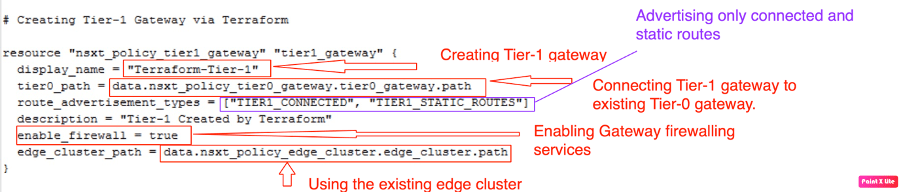
Creating resources for creating a new Tier-1 gateway via Terraform.
Configuring Logical Segments using Terraform
Now is the right time to get our hands dirty and start creating logical segments, as per the topology diagram. We will start with “Web Segment”.
| Segment Name | Web-Segment |
| Subnet | 10.1.1.1/24 |
| Connecting Tier-1 gateway | Terraform-Tier-1 |
| Transport Zones | Overlay_TZ |
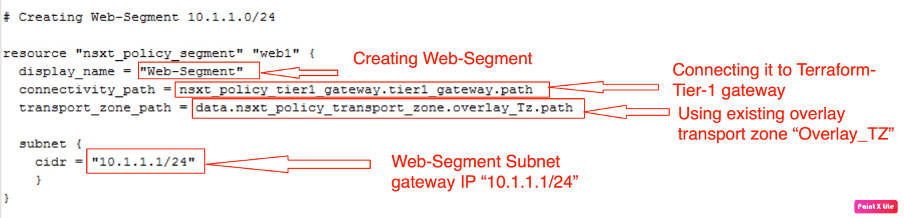
Creating resources for creating a new Web-Segment via Terraform.
Now we will create “App-Segment”
| Segment Name | App-Segment |
| Subnet | 10.1.2.1/24 |
| Connecting Tier-1 gateway | Terraform-Tier-1 |
| Transport Zones | Overlay_TZ |

Creating resources for creating a new App-Segment via Terraform.
Now we will create “DB-Segment”
| Segment Name | DB-Segment |
| Subnet | 10.1.3.1/24 |
| Connecting Tier-1 gateway | Terraform-Tier-1 |
| Transport Zones | Overlay_TZ |

Creating resources for creating a new DB-Segment via Terraform.
Configuring Security Groups using Terraform
As in the above steps, we have configured the Tier-1 gateway along with it, and we have also configured three logical segments. Now, it is the time to move ahead and start building distributed firewall logical constructs like “Security-Groups”, and Services like “TCP-8443”.These constructs will be very useful in DFW and Gateway firewalling. Let’s start with security groups, in this we will create “Web-group”.
| Security Group Name | Web-group |
| Criteria | Key = Name Member_type = VirtualMachine Operator = STARTSWITH Value = “web” |

Let’s proceed further and create another group called “App-group”.
| Security Group Name | Web-group |
| Criteria | Key = Name Member_type = VirtualMachine Operator = STARTSWITH Value = “app” |
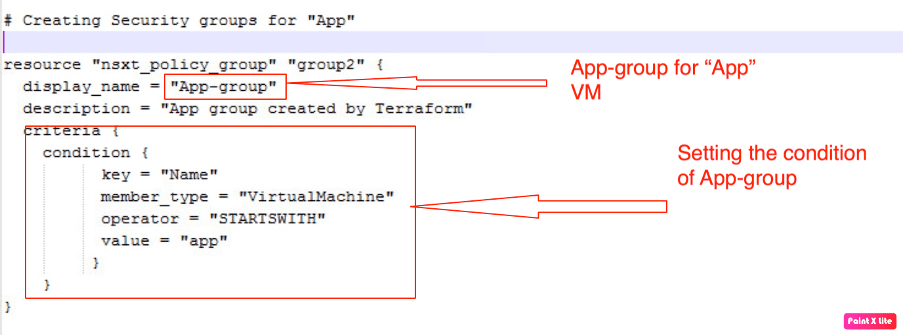
In our environment we have all three types of VM, so we are creating only three security groups, Two we have already created, and now let’s create the last one “DB-group”.
| Security Group Name | DB-group |
| Criteria | Key = Name Member_type = VirtualMachine Operator = STARTSWITH Value = “db” |
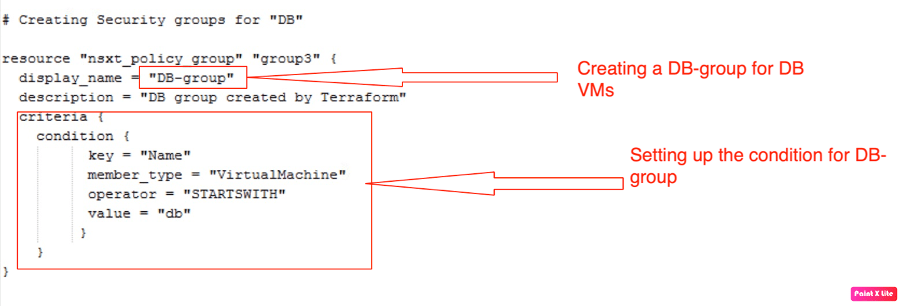
Configuring Data sources(services) using Terraform
Let’s proceed with another logical construct called services” required to configure both distributed and gateway firewalling.
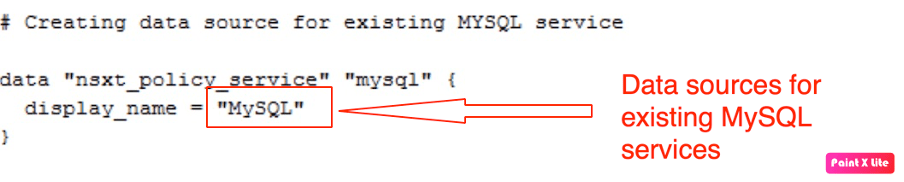
Below are the two data sources created for existing services (HTTPS, MySQL).

Configuring Services using Terraform
Now, it is time to create a Terraform resource for creating a new service (TCP-8443).

Configuring Security policies along with rules using Terraform
We have already built all necessary NSX-T constructs to build distributed firewalling along with gateway firewall rules. In this step, let’s discuss distributed firewall policies and rules.
Distributed Security Policies and Rules
Below are the new security policy details, which we will create via “Terraform”.
| Security Policy Name | 3-Tier-Policy |
| Scope | Web-group, App-group, DB-group |
| TCP_Strict, Locked, Stateful | Enabled |
| Logging | Enabled |
| Category | Application |

The above also showcases rule-1, which will allow HTTPS traffic to Web-Group.

However, rule-2 will allow only “TCP-8443” traffic from “Web-group” to “App-group”.

In rule-3, we will allow only “MySQL” traffic from “App-group” to “DB-group”.

In rule-4, we will reject all other traffic. However, to use micro-segmentation we have to set the default allow rule to reject, which we will update via Terraform soon.
Gateway Firewall Policies and Rules
In this step, we will configure gateway firewall rules via Terraform, which will be applied to the “Terraform-Tier-1” gateway.
| Security Policy Name | Gateway-3-policy |
| Sequence_Number | 1 |
| TCP_Strict, Locked | Enabled |
| Category | Local Gateway Rules |

In the next step, we will configure rule-1, which will allow only HTTPS traffic from outside to Web-group.
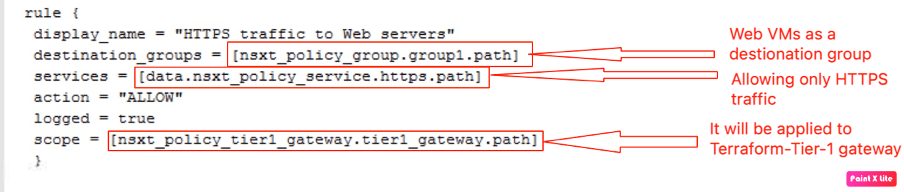
In the last step, we will configure rule-2 to reject all other traffic. We are not amending the default rule, which is “allow” by default.

So far we have spent all our time in creating the terrafrom script. Let’s proceed with implementation.
Make sure to configure the “terraform directory” and create a script using the “vim” tool of Linux.

In order to proceed to the configuration, let’s run “Terraform init” to validate the script, which we created above.

After the initialization, it is time to apply the configuration or plan your terraform script. In this article, we will be skipping the “Terraform plan”.
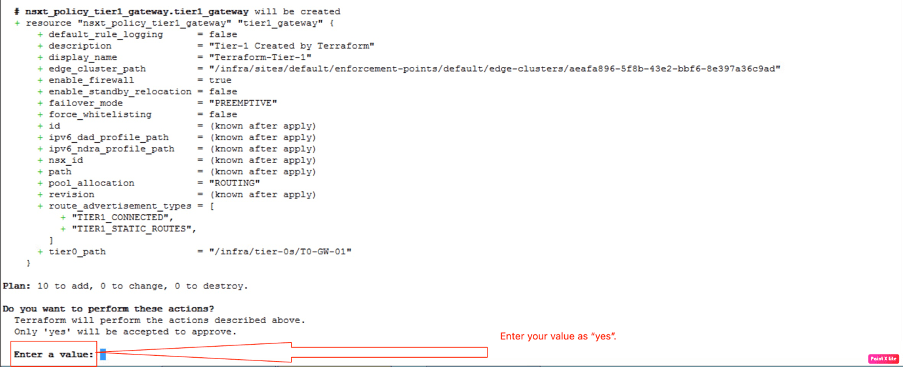
Before configuring any NSX-T logical constructs, Terraform will ask for your input, on whether to proceed with configuration or not. Enter the value as “yes”.

We will validate that 10 NSX-T logical resources will be created.
Post-validation
In this part of the blog, we will verify in NSX-T whether logical constructs are created by Terraform or not. Let’s start with the Terraform-Tier-1 gateway, created by Terraform.
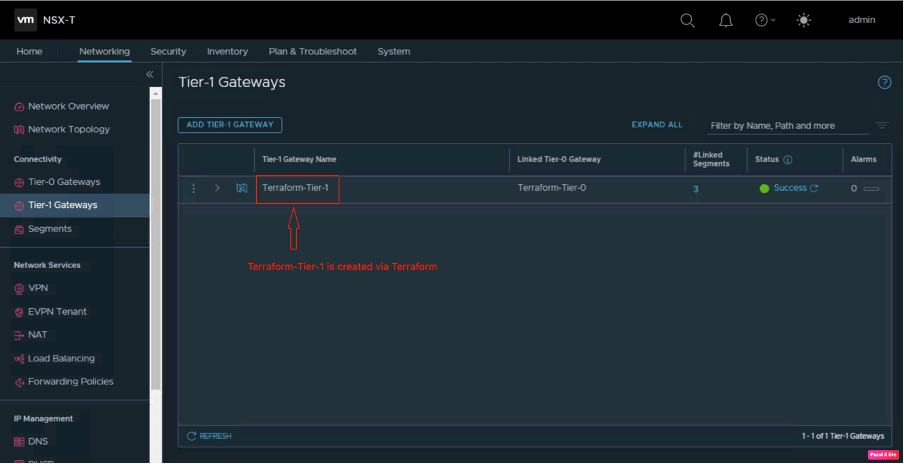
To verify the same login into NSX-T manager navigate to Networking and then go to Tier-1 gateway.

It’s time to verify the logical segments, whether these are created or not. Navigate to Networking and then go to Segments.
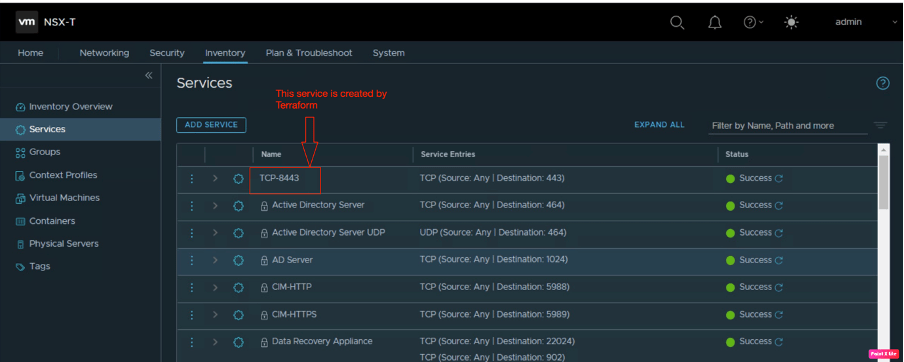
We have also created one TCP-8443 service, navigate to inventory, and go to Services.
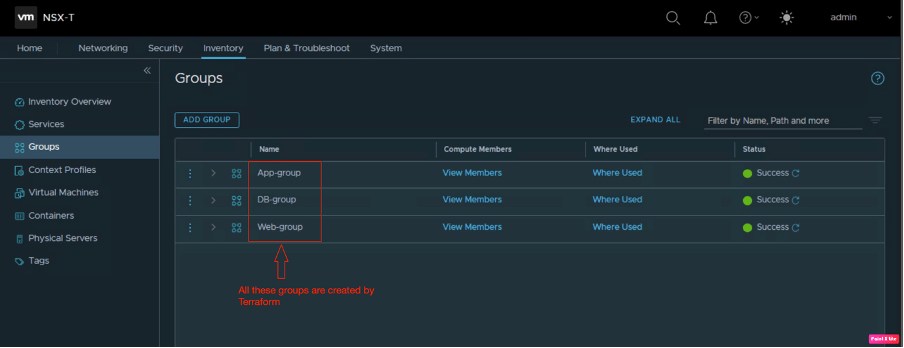
Let’s proceed further and verify the remaining logical constructs, navigate to inventory, and go to Groups.

In order to restrict the traffic among various tiers of an application, we have also configured distributed firewalling. Navigate to security and go to the Distributed Firewall.
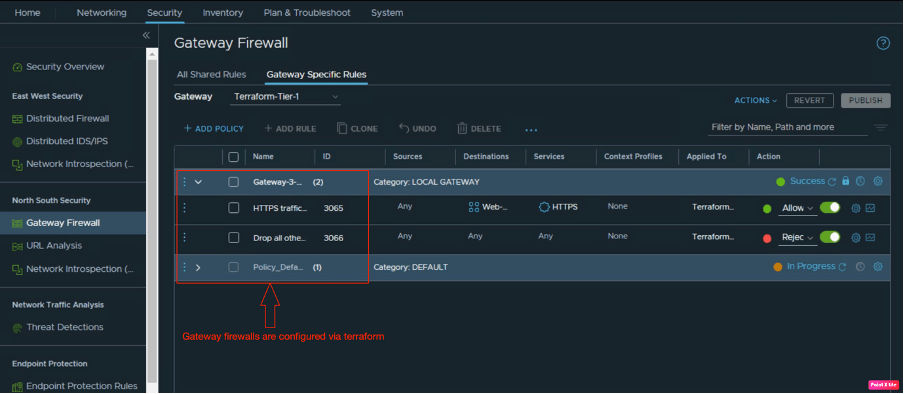
In the last part of the blog, we are also verifying the gateway firewall policies configured by Terraform. Navigate to security and go to Gateway Firewall.
In Summary:
How it is easy to configure any environment using automation tools like Terraform.
Using the same approach, we have shown in this blog, how different the NSX-T logical constructs like Tier-1, logical segments, groups, services, and distributed firewalls can be configured using Terraform. In this blog, we have created a script called “test.tf” to build all desired NSX-T logical constructs. We have also validated the script using Terraform init and applied the configuration using the Terraform apply command.
In upcoming blogs, we will discuss on EVPN functionality in NSX-T, how NSX-ALB can be integrated with VCD, and Kubernetes as a service in VCD.


 vxlearners
Leave a comment