

In this blog, we will discuss how “North-South” traffic can be controlled on the OrgVDC Tier-1 gateway using the “Gateway firewalling” feature of NSX-T. In this case blog, all firewall rules will be configured on the Tier-1 gateway of OrgVDC, which belongs to a specific organization, let’s say “OrganizationA”. However, we have already integrated NSX-T with VMware Cloud Director in the previous series with and without data center groups. Using the same concept, we have already deployed three stretch segments, one for “Web”, the second one for “APP” and another one for “Web”. All these segments are connected to a single Stretch Tier-1 gateway. We have also seen micro-segmentation on VCD in the last blog (https://vxlearners.com/2023/08/11/micro-segmentation-on-vcd-using-nsx-t/), but, in this blog, we have disabled all DFW rules, and leverage the functionality of gateway firewalling of NSX-T.
Topology Diagram
In this scenario, we already deployed one Parent T0 gateway, which will have 2 edge nodes at the primary site and two at the secondary DC. A separate VRF Tier-0 has been created for the organization “OrganizationA”, which will provide north-south communication. We have also deployed three NSX-T overlay segments, which are stretched across OrgVDC-1 and Org-VDC-2, connected to stretch Tier-1 gateway (T1-VRF-VDC-1).
| NSX-T Overlay Segment | Subnet | Gateway (T1-VRF-VDC-1) |
| Web-Segment | 10.1.1.0/24 | 10.1.1.1/24 |
| App-Segment | 10.1.2.0/24 | 10.1.2.1/24 |
| DB-Segment | 10.1.3.0/24 | 10.1.3.1/24 |
In the current situation, VMs in Web-Segment, App-Segment, and DB-Segment can communicate with each other either via TCP, UDP, or IP, using the default rule of Distributed firewalling.

In order, to stimulate “North-South” traffic, we will configure a new segment and connect it directly to Tier-0 or Tier-1 gateway. A VM will be connected to this new segment with an IP address of “10.1.4.10”.
| NSX-T Overlay Segment | Subnet | Gateway (T0 VRF-VDC-1) |
| Test-Segment | 10.1.4.0/24 | 10.1.4.1/24 |
From this “Test-VM”, we will try to connect to “Web-VM,” “App-VM” and “DB-VM” on protocols like “SSH” and “ICMP”. However, all the traffic will get dropped on the Tier-1 gateway as it matches the default rule, which has an action of “DROP”. To allow traffic for “SSH” and “ICMP”, we will configure gateway firewall rules on the Tier-1 gateway, which belongs to OrgVDC-1 and Org-VDC-2, and will keep the default rule as it is.
Pre-validation
Before proceeding with some pre-validation, below are the IP addresses of four VMs including a “Test-VM”.
| Web-VM | 10.1.1.100 |
| APP-VM | 10.1.2.100 |
| DB-VM | 10.1.3.100 |
| TEST-VM | 10.1.4.100 |
In this step, we will validate “SSH” and “IP” connectivity from “Test-VM” to all other VMs like Web-Segment, App-Segment, and DB-Segment. Firstly, we will log in to “Test-VM” and try to connect “Web-VM”, “App-VM” and “DB-VM” over “SSH” and “ICMP”.
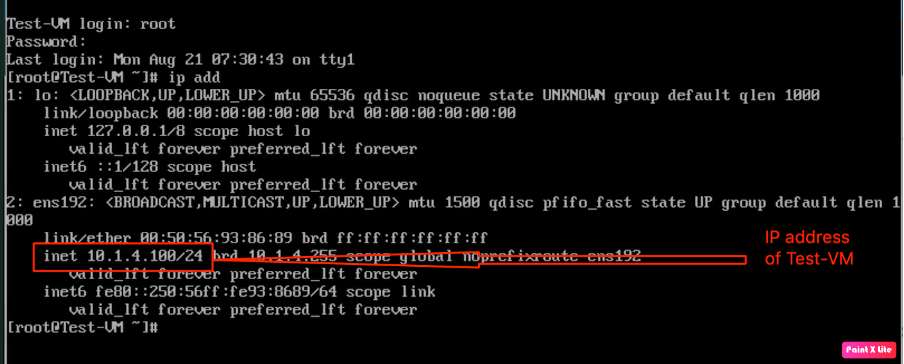
In order to verify the IP address of “Test-VM”, we logged in into “Test-VM” and check verified that Test-VM has been configured with “10.1.4.100/24”.

In this step, we are trying to connect Web-VM from Test-VM via “SSH” and “ICMP”, however, the connectivity would not be established because it matches the default rule of the Tier-1 gateway, which is “Drop”.
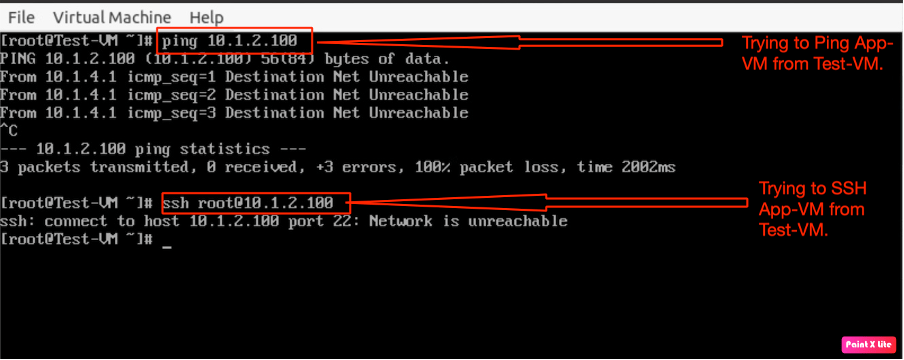
In this step, we are trying to connect App-VM from Test-VM via “SSH” and “ICMP”, however, the connectivity would not be established because it matches the default rule of the Tier-1 gateway, which is “Drop”.
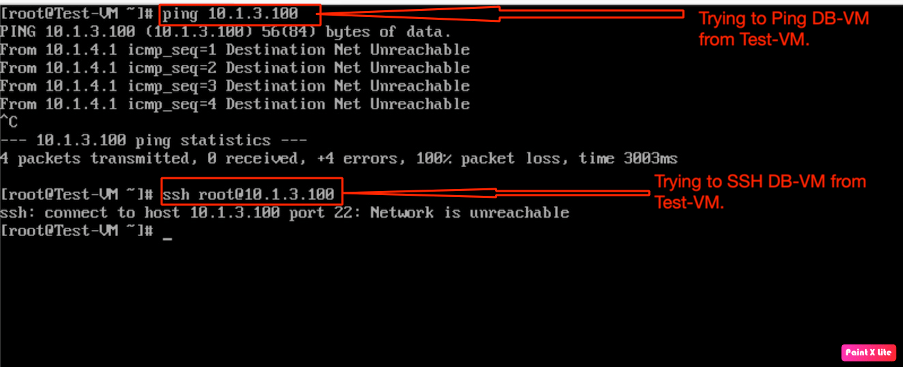
In the last step, we will also verify the “SSH” and “ICMP” connectivity to DB-VM from “Test-VM”, however, we observe the same result, because all traffic matches the default rule on the Tier-1 gateway.
In the last step, we will verify from VCD the default gateway firewall, which is dropping all the traffic. Before enforcing Gateway-Firewalling. In order to verify the existing firewall rules on the Tier-1 gateway in VCD, go to Networking, navigate to Edge Gateways, and select the Edge gateway, on which you want to verify the firewall rules.
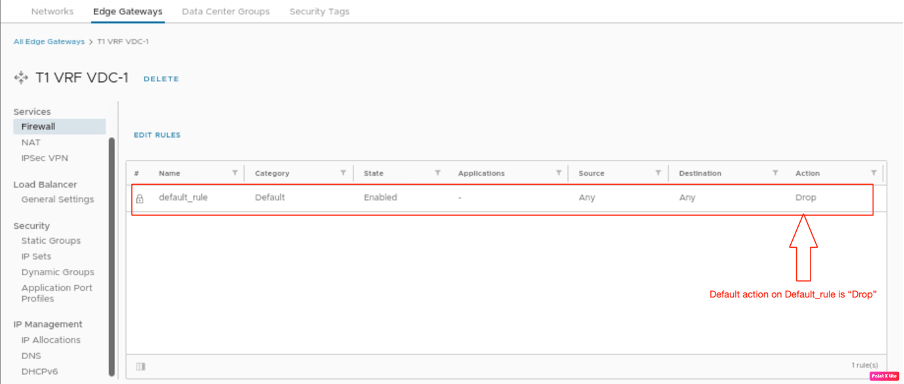
Go to services, and navigate to the firewall.
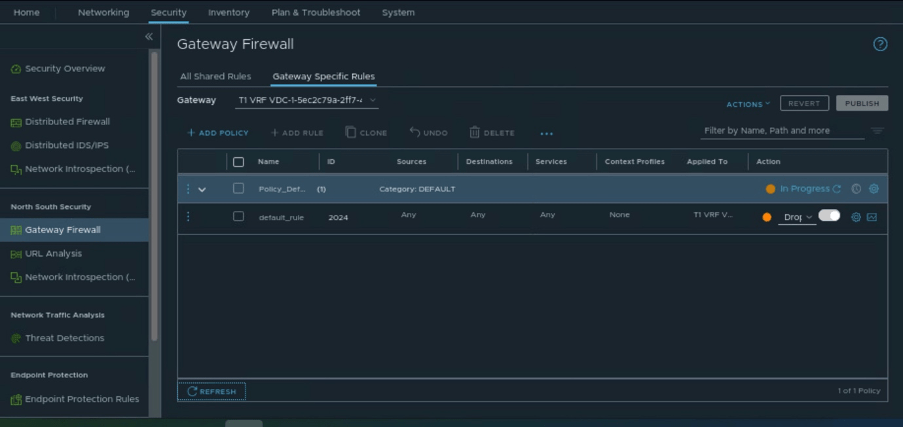
Let’s also verify the status of the Tier-1 gateway firewall from “NSX-T”.
Configuring Gateway Firewalling on VCD
In order to configure firewall policies and rules, we need to configure logical constructs like “Tags”, “Security groups”, and “Services”. However, in the previous blog(https://vxlearners.com/2023/08/11/micro-segmentation-on-vcd-using-nsx-t/), we have already configured security groups and tags. Therefore, we will leverage the same logical constructs to configure firewall policies/rules. We will also be using pre-defined services or application profiles defined within VCD and NSX-T.

Before proceeding with configuration, we will verify the status of newly created “tags” in VCD.
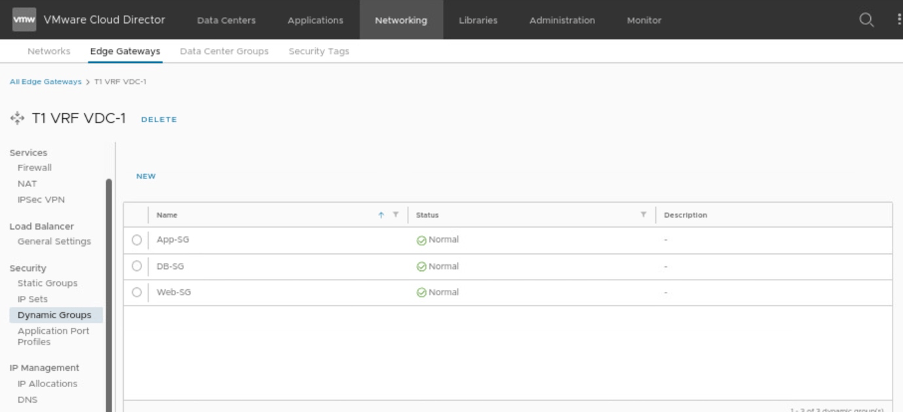
Verifying the status of newly created “Security Groups” in VCD.
Configuring Gateway Firewall rules in VCD or NSX-T.
In order to start the configuration, we need to configure firewall rules to allow “SSH” and ICMP traffic from “Test-VM” to all three VMs (Web-VM, App-VM, and DB-VM). All these rules will be created in VCD and will be visible on NSX-T, which will be enforced on the “downlink” of the Tier-1 gateway (T1 VRF VDC-1). However, in the earlier section of this documentation, we have already created the required logical constructs, which are essential to enforce security policies from both NSX-T and VCD.
In order to create firewall rules, go to edge gateway in VCD, then to firewall rules.
In the first rule, we will allow traffic SSH from “Test-VM” to all three VMs, “Web-VM”, “App-VM”, and “DB-VM”.
| Name | Allow SSH to all VMs |
| Applied to | DFW |
| Category | User-defined |
| State | Enabled |
| Applications | SSH |
| Source | Any |
| Destination | “Web-SG”, “App-SG”, “DB-SG” |
| Action | Allow |
| IP Protocol | IPv4 |
| Logging | Enabled |
In the second rule, we will allow ICMP traffic from “Test-VM” to all three VMs, “Web-VM”, “App-VM”, and “DB-VM”.
| Name | Allow ICMP to all VMs |
| Applied to | DFW |
| Category | User-defined |
| State | Enabled |
| Applications | ICMP |
| Source | Any |
| Destination | “Web-SG”, “App-SG”, “DB-SG” |
| Action | Allow |
| IP Protocol | IPv4 |
| Logging | Enabled |
However, we are not modifying the behavior of default_rule, which will be “Drop” in our scenario.

We will verify the Firewall policies/ rules in NSX-T, in order to verify whether the rules and policies are configured in NSX-T, go to Security, navigate to “Gateway Firewall” and select Tier-1”, “T1 VRF-VDC-1” and select “Gateway Specific Rules”.
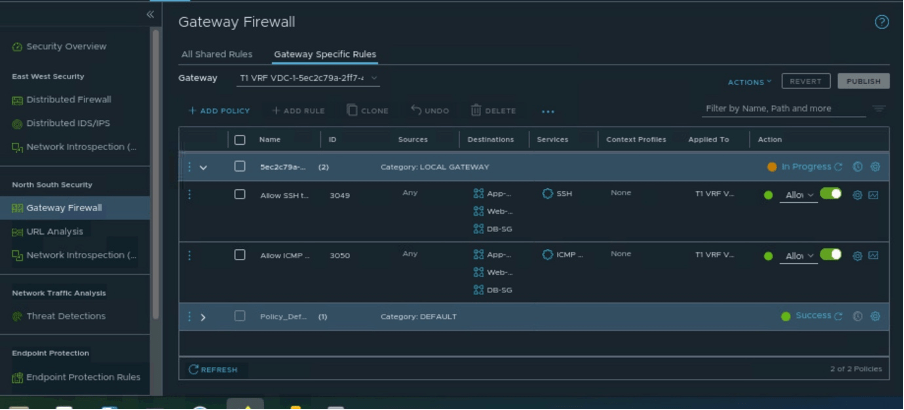
Post-validation
As we have already configured the firewall rules in VCD in the previous section, to verify that rules have been enforced correctly, we will log in to “Test-VM” and generate “SSH” and “ICMP” traffic for all other VMs “Web-VM”, “App-VM”, and “DB-VM”.
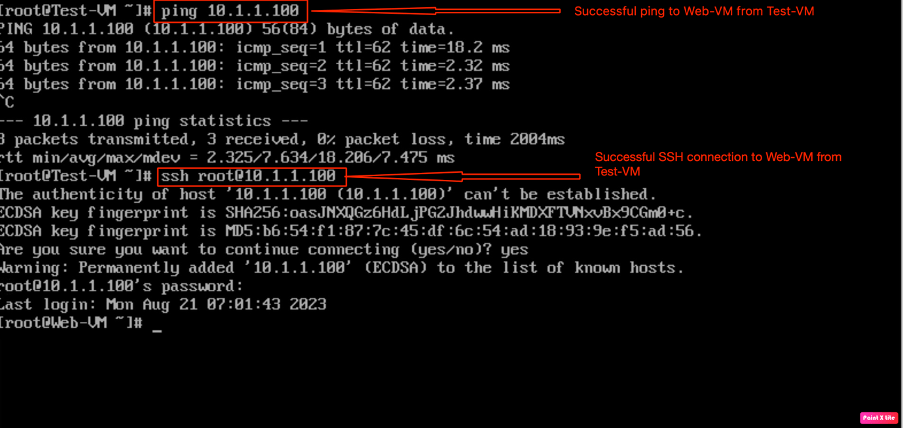
In this step, we have verified that “Test-VM” is able to SSH and PING “Web-VM”.
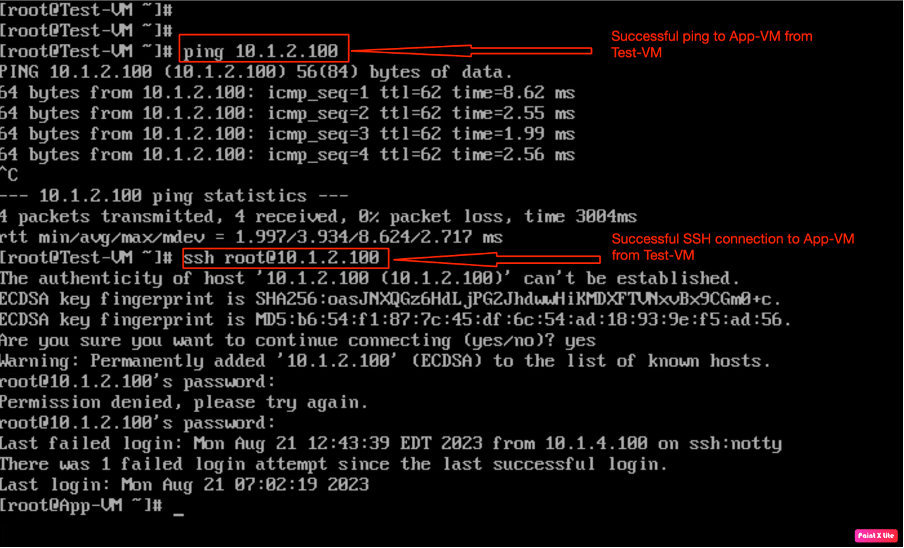
In the next step, we have verified that “Test-VM” is able to SSH and PING “App-VM”.

In the last step, we have verified that “Test-VM” is able to SSH and PING “DB-VM”.
Post-Validation from NSX-T
In this part, we will explore more options to validate the enforcement of security policies like trace flow(an inbuilt feature of NSX-T).
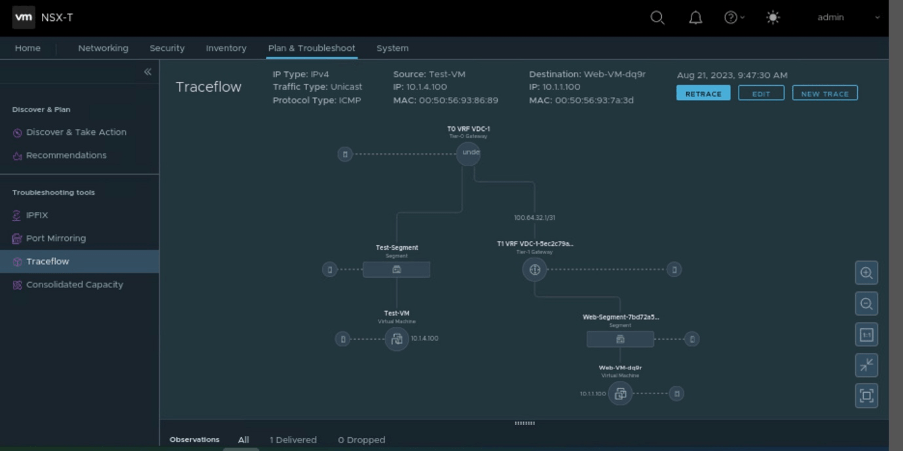
In this scenario, we have generated ICMP traffic from Test-VM to Web-VM, and it was allowed by rule-id 3050 (auto-generated by NSX-T), rule-2 of the newly created security policy.
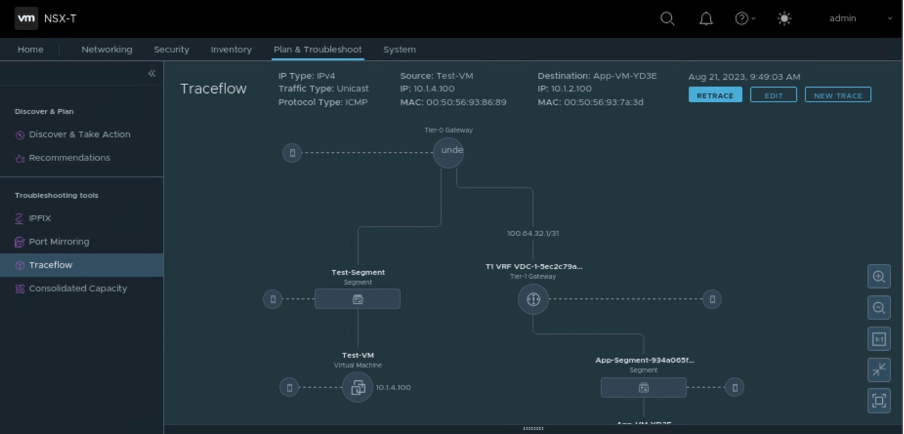
In this stage of the blog, we have generated ICMP traffic from Test-VM to App-VM, and it was allowed by rule-id 3050 (auto-generated by NSX-T), rule-2 of new created security policy.

At last, we generated ICMP traffic from Test-VM to DB-VM, and it was allowed by rule-id 3050 (auto-generated by NSX-T), rule-2 of the newly created security policy.
In Summary:
This blog discusses how gateway firewalling can be enforced from either NSX-T or VCD (OrgVDC). All necessary components required to create security policies, and rules are configured from VCD (OrgVDC) like tags, dynamic security groups, and so on. The Gateway firewalling feature of NSX-T provides network security for North-South communication. In the next series of blogs, we will emphasize NSX ALB integration with VCD, automating NSX-T via Terraform and Kubernetes as a service in VCD.


 vxlearners
Leave a comment